Guides
How to Plan a Mobile App (iOS and Android)
27 May 2026 · 8 min read · By Akash Sadavarte
To plan a mobile app for iOS and Android, define the one job the app does for users, map the main flow from first open to delivered value, decide between native and cross-platform, and cut the scope to the core. Good planning is mostly about deciding what to leave out. The clearer your plan, the faster and cheaper the build. Here is how to do it step by step.
Step 1: Define the one job the app does
Every good app does one thing well before it does anything else. Write down the single job your app performs for a user and the moment it delivers on that promise. "Lets a user book a home cleaning in under a minute" is a job. "A platform for home services" is not.
This sentence anchors every later decision. When a feature comes up, you ask whether it helps the app do its one job. If not, it waits. Apps drift and bloat when this anchor is missing, and bloat is what makes them slow and expensive to build.
Step 2: Map the core user flow
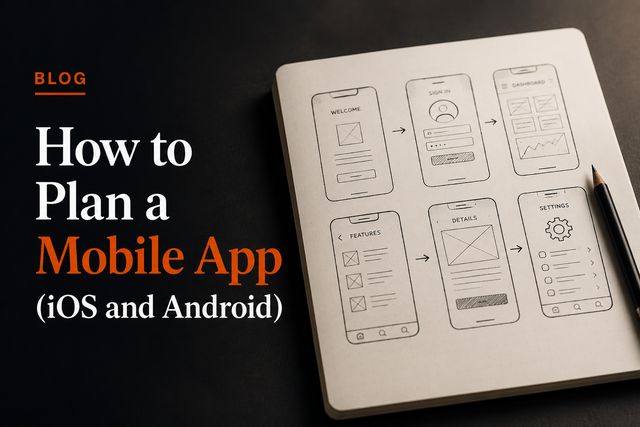
Before any visual design, map the path a user takes from opening the app to getting value. List the screens on that path in order, and only that path. A booking app might be: open, choose service, pick time, pay, confirm. Five screens, not fifty.
Everything off that main path, such as settings, profile editing and edge cases, is secondary. Map the core flow tightly and keep the rest minimal for the first version. This single step prevents a huge amount of wasted design and build work.
Step 3: Decide native or cross-platform
This is the defining technical choice for a mobile app, and it shapes both cost and timeline.
- Cross-platform builds iOS and Android from one codebase. It is faster and cheaper for most apps and is the sensible default unless you have a specific reason not to use it.
- Native means separate iOS and Android builds. It is worth it when you need heavy device features, top performance, or a highly polished platform-specific feel, but it costs more and takes longer.
Most early apps do well with cross-platform. The decision interacts with your timeline, which we break down in how long it takes to build an app. If you are unsure, a senior team can tell you quickly which path fits your product.
Step 4: Choose which platform to launch on
You do not always have to launch on both platforms at once. Build for where your users are. If most of your early audience is on one platform, start there, learn, then expand. If your idea genuinely needs both from day one, a cross-platform approach covers them together.
Launching on one platform first is a valid way to keep the first build small and learn faster, in the same spirit as building an MVP step by step. You can always add the second platform once the core idea is proven.
Step 5: Scope tightly for the first version
The fastest, cheapest, and most successful first apps are small. Split your feature ideas into two lists: needed for the app to do its one job, and everything else. Build only the first list now.
Practical ways to keep scope tight:
- One user type to start. Each extra role adds screens, permissions and testing.
- Use proven services. Use existing tools for payments, maps, notifications and auth rather than building them.
- Skip the admin panel early. You can manage data by hand while you have few users.
- Leave polish for later where it does not affect the core. Refine secondary screens after launch.
A smaller scope ships sooner and costs less, and it gives you real user feedback earlier, which is the whole point of a first release.
Step 6: Plan for app store realities
Mobile apps have rules and waits that web apps do not. Both Apple and Google review submissions, which adds days at the end that you do not control. They also have guidelines your app must meet, around things like sign-in, payments and privacy. Account for these in your plan so they do not surprise you near launch.
You will also need app store assets: an icon, screenshots, a description and a privacy policy. None of these are hard, but they take time, so put them on the plan rather than scrambling at the end.
Step 7: Plan the build team
A mobile app is mostly labour, so who builds it decides the cost, the timeline and the quality. A small senior team writes less code, makes fewer expensive mistakes, and moves faster than a large junior one. Avoid hand-offs: every middle layer between you and the engineers adds delay and lost detail.
This is how we run mobile app development. A small senior team, billed weekly, with you talking directly to the people building your app. A senior engineer with us starts at about $20 an hour, so a real, well-built app stays within reach. You can see how it works on our mobile app development service page.
Turning the plan into a build
A clear plan makes the build faster, cheaper and far less stressful. Bring your one-line job, your mapped core flow, your platform choice and your tight feature list to a team that can build it without layers in between.
That is exactly what we are set up for. The price is on the page before you commit, and a real person will pressure-test your plan in a 15-minute call so you start the build with confidence rather than guesswork.
See our mobile app development service →
FAQ
Quick answers.
How do I plan a mobile app?
Start with the one job the app does for users, map the main flow from open to value, decide between native and cross-platform, and cut scope to the core. Planning is about deciding what to leave out as much as what to build.
Should I build for iOS or Android first?
Build for where your users are. If most early users are on one platform, start there. If you need both from day one, a cross-platform approach can deliver iOS and Android from a single codebase, which saves time and cost.
Native or cross-platform: which should I choose?
Cross-platform is faster and cheaper for most apps and covers both platforms from one codebase. Native is worth it when you need heavy device features, top performance or a highly polished platform-specific feel. Most early apps do well with cross-platform.
How long does it take to plan a mobile app?
The planning phase usually takes one to three weeks. It is time well spent, since clear scope and a mapped user flow prevent far more expensive changes once the build is underway.