Industry
Building Workforce-Management Software: Lessons from VBSA
21 May 2026 · 8 min read · By Prarthana Warrier
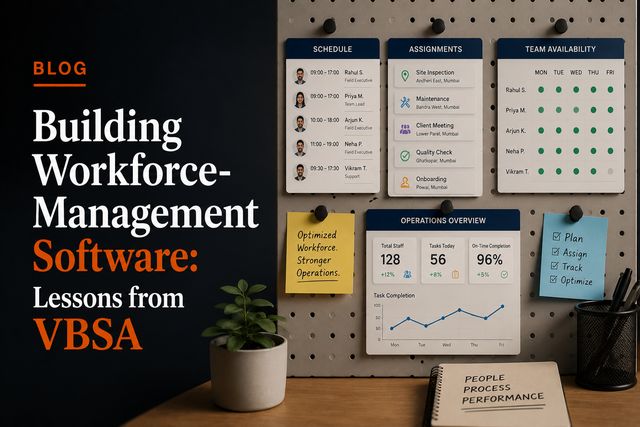
Workforce management software development is, at its heart, the job of replacing spreadsheets and manual coordination with one reliable system for allocating people, planning resources and tracking work as it happens. The technical interest is not in any single feature; it is in giving office staff and field staff a single source of truth they both trust. We learned this building VBSA, and the lessons apply to anyone digitising how a workforce is run. Here they are, honestly.
The enemy is the spreadsheet, and it is tougher than it looks
Almost every workforce starts on spreadsheets, and for good reason: they are flexible, familiar and free. The job of new software is not to add features a spreadsheet lacks. It is to win against something people already know how to use. That sets a high bar, because if the software is slower or more rigid than the sheet it replaces, people quietly go back to the sheet.
Spreadsheets fail at scale in specific ways: no real-time sync, so two copies drift apart; no field access, so the truth lives on one laptop; no validation, so errors creep in unnoticed; and no history, so no one can say what changed or when. Good workforce software has to beat the spreadsheet on convenience first, and only then on power. With VBSA the win came from making allocation faster and visible to everyone at once, not from a long feature list.
Office and field are two different products that share one truth
The single biggest design lesson is that you are building for two very different users at the same time. Managers in the office need a dashboard: an overview, planning tools, the ability to allocate people across jobs. Field staff need something else entirely: a mobile app that is fast, simple, and works in the conditions of real work, sometimes with a patchy connection.
For VBSA we built exactly this pairing, a CRM dashboard for manpower allocation and large-scale resource planning, and a field mobile app for the people on the ground. The two are different experiences, but they must read and write the same data in near real time. The dashboard is useless if it shows yesterday's reality; the app is useless if what field staff record never reaches the office. The shared source of truth is the whole point, and getting that sync right is most of the real engineering.
Allocation is a data-modelling problem first
Allocating people to work sounds simple and is not. A person has skills, availability, a location and existing assignments. A job has requirements, a timeframe and a place. Matching the two, and handling the constant churn as plans change, is fundamentally a data-modelling problem. Get the model right and features fall out of it naturally; get it wrong and every feature fights the structure.
This is the same lesson we stress for any serious SaaS build: decide the data model deliberately and early, because retrofitting structure is the most expensive work there is. In workforce software the core entities, people, jobs, assignments and their states, deserve careful thought before a single screen is designed.
Reliability is the feature people judge you on
Workforce software is operational software. If it is down, work does not get allocated and people do not know where to go. That makes reliability the feature users actually grade you on, above anything in the interface. A beautiful dashboard that is occasionally wrong is worse than a plain one that is always right.
In practice that means treating data integrity seriously, validating input so bad data never enters, handling the offline and poor-connection cases that field work involves, and keeping a record of changes so disputes have an answer. It is unglamorous engineering, and it is exactly what earns the trust that makes a workforce abandon its spreadsheets for good.
Ship the painful part first, then grow
You do not build the whole system before anyone uses it. The right approach is to find the most painful part of the current process, the allocation that takes hours every morning, the field updates that never reach the office, and replace just that, well. Once people trust the first piece, you extend it based on what real usage reveals.
This staged approach is the same one behind every product we ship, and it is the heart of how we run end-to-end ownership: deliver something real and useful early, then iterate with the people who depend on it. It keeps the build affordable and, more importantly, keeps it aligned with how the work actually happens. The full VBSA case study shows where that approach led.
One accountable team, not a relay race
Workforce software touches a lot of moving parts, dashboard, mobile app, data sync, real operations, and that is exactly the kind of project that suffers when it is split across hand-offs. When the people building the app, the dashboard and the backend are one team, the shared source of truth stays coherent because one group owns it end to end.
That is how we built VBSA, and you can see the same end-to-end approach across our other work, an evaluation platform for Nova Mark and a consumer mobility app for The 3-20 Way, on our work page. Different domains, one accountable team each time.
How we build workforce software
We build operational software the way this guide describes, because we have done it: model the work first, beat the spreadsheet on convenience, pair a manager dashboard with a real field app, and treat reliability as the headline feature. A small senior team, billed from about $20 an hour, owns the whole build, and you talk to the engineers rather than an account layer. If you are trying to get a workforce off spreadsheets, read the full VBSA case study and tell us where your worst daily friction is, that is where we would start.
FAQ
Quick answers.
What does workforce management software actually do?
It replaces spreadsheets and manual coordination with a single system for allocating people, planning resources, and tracking work in the field. The goal is one source of truth that office and field staff both trust.
Why do spreadsheets fail for managing a workforce?
Spreadsheets break down at scale because they have no real-time sync, no field access, no validation, and no audit trail. Two people editing two copies is enough to lose the single source of truth.
Does workforce management software need a mobile app?
Usually yes. The work happens in the field, not at a desk, so field staff need a mobile app while managers use a dashboard. Both must read and write the same data in near real time.
How long does it take to build workforce management software?
A focused first version replacing the worst of the spreadsheets can ship in a few months with a small senior team, then grow as real usage reveals what matters most.